Hi-Ho, Hi-Ho
In my last post, I learned about rubberducking, realized some of my UI safeguards were actually causing problems, and discovered that my Blueprint logic was off.
The end of this milestone had me sweating a little. Things seemed to totally broken, and I was projecting far more confidence than I actually felt about fixing them.
Undeterred however, I persevered onward. I hopped back into Unreal Engine and began working through my logic bit-by-bit, rubberducking as I went along.
Cutting Through the Bramble
From what I understand, no programmer seems to enjoy going back through their own code and explaining their logic. I imagine they, like me, assume “there is absolutely nothing wrong with my logic it is 100% clever and would never be incorrect.”
I picked up where I’d left off on my “Happy Path” route from last week, and within an hour I was completely lost.
I couldn’t trace where I needed to go. I had functions inside of functions, nodes that no longer made sense, nothing calling to the LLM through JSON objects (what?!), and wires that were double-firing on my Print String debug statements. I didn’t even know where to begin unraveling that any of it as I trekked further and further into the swamp.
Time to Go Back to Square-Something
This moment of realizing that my coding had perhaps gotten out of hand was actually a moment of great enlightenment.
It became clear that, in my excitement, I had subconsciously assumed that things needed to be complicated.
That… is incredibly wrong.
I needed a simple path. A to B. Do the thing!
I remembered that my lighthouse keeper Blueprint (which I had wisely duplicated, just in case) technically worked. Even though the player input prompt was hard-wired into the Blueprint, the LLM still responded to the call from the engine.
All I needed to do was figure out how to do that again-but instead of using a hard-wired user input prompt, I needed an editable text field where the player could send their own input to the LLM.
Also, Jenny needed to be an apple-seller, not a lighthouse keeper, so her NPC “seed” needed to be included too.
Theoretically, I just needed to copy most of the working Blueprint and make a few small adjustments. I decided to forgo the UI safeguards and polishing (for now) in order to get the simple function I needed: call to Jenny, and she calls back.
Re-Stitching the Code
I decided to rebuild a new Blueprint from the ground up and stitch together only the parts I knew worked.
This version needed to be cleaner, have a more direct path, and (most importantly) be efficient and simple.
As I rebuilt it, I followed this basic order based on my working BP:
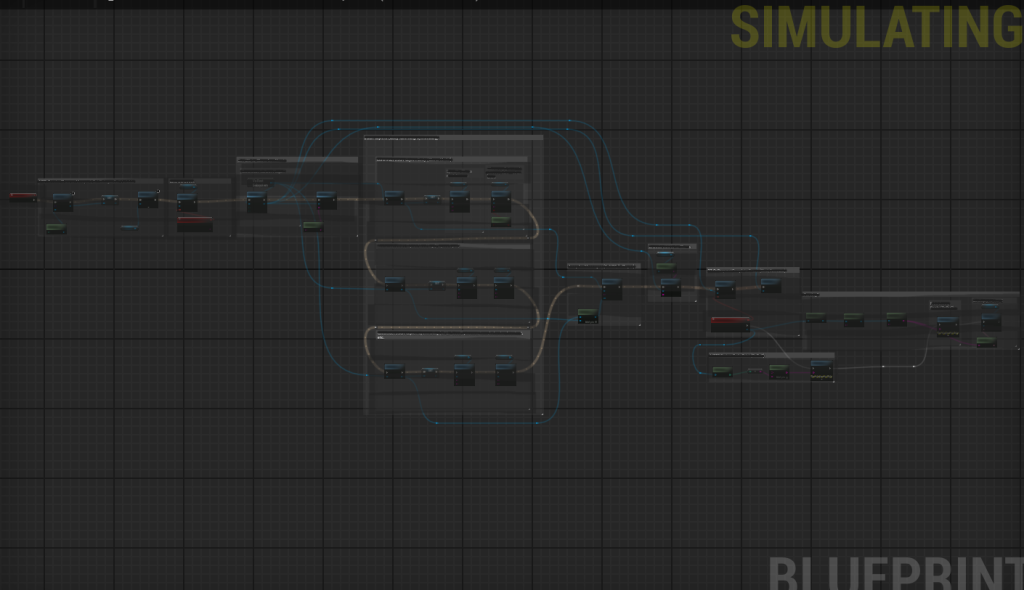
I made sure to keep the new Blueprint clean and easy to read. I also insisted that everything I added had to be explainable…to my cat. If I couldn’t walk him through the logic step by step, then it probably didn’t belong in the Blueprint.
Almost There!
Following this hunch led to a semi-working Blueprint again. The engine was connecting to the LLM (my status code proved that), and I had successfully removed the lighthouse keeper seed and hard-wired user prompt. In their place, I added my apple-seller persona seed and a player input prompt text box that would get encoded into JSON and sent to the LLM.
There was only one problem left.
The LLM was responding before I hit the send button on the prompt box.
This one got me for some time. The wiring looked straightforward, I was sure everything in the Blueprint belonged there and worked. So why was the LLM jumping the gun?
These Little Things Called “Events”
Events are signals or triggers that tell the Blueprint to do something when a specific condition happens.
In my naivety, I literally thought that the software just “knew” what an event was supposed to do. Like magic.
I turns out that they don’t automatically “know” anything by default. You define their behavior through connected logic.
I had added some Custom Events which are are events you create yourself; they only run when something calls or binds to them.
I also added “Bind to Event” nodes before because that’s what Unreal’s documentation says to do. Binding an Event means linking it to a specific action so that it automatically fires when that action occurs.
I didn’t truly understand this at first. When I was rubberducking I glazed over explaining this part, but later wondered if this was my issue.
As I was staring at my white exec wires through my nodes, I noticed something funny: event order and direction might matter…
My issue (the LLM responding before the player had even sent input) was happening because the event I created to check for the message being sent was wired in sequence without a pause.
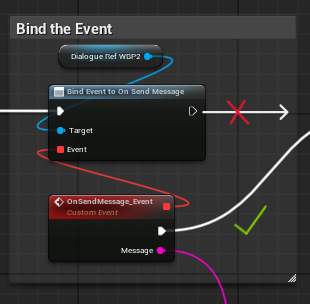
The code never stopped to check whether the user input was sent. I had wired it straight from the Bind Event node through the rest of the Blueprint.
Once I disconnected that wire and instead routed it through the event itself, the code finally paused to wait for that signal before continuing down the “Happy Path.”
I hit play in PIE, waited… and did a double take with a little scream as I saw what happened next!
Jenny responded after my prompt was sent and in the apple-seller persona to boot!!!
Am I Done Now?
The moment I got this to work, I’ll admit, I did a victory lap around my living room.
The intelligent NPC works as planned. However, I’m not done yet!
What is Left?
The UI still needs polishing. The text doesn’t wrap, the player input box doesn’t clear after sending, and the player can only send by clicking the button (not by pressing Enter). The Send button also doesn’t disable after input is sent, or re-enable after the LLM responds.
Jenny’s persona seed might need some tweaking, too, to expand her character range, align with the prototype’s goals, and make sure she doesn’t break the fourth wall by admitting she’s an LLM. (Yes… I got her to admit that once.)
Onward to the Final Milestone: Milestone 5
With the user and LLM conversation finally functioning as intended, the foundation of the intelligent NPC prototype is complete.
From here, it’s all about refinement: tightening the UI flow, improving reliability, and deepening Jenny’s personality traits to make her more consistent and believable.
I now have a fully working loop between Unreal and the LLM, and that means the real polish phase can begin. Milestone 5 will focus on expanding her dialogue depth, implementing stability checks, and preparing the prototype for presentation.
Time to push ahead and bring Jenny Applebaum fully to life!
Until next time,
~Lauren
