When a Meteor Hits!
Up until this point, Discovery Park had momentum.
Systems were working. Lighting was coming together. The project felt like it was moving forward. I was learning, and my Unreal Engine skill gaps were starting to fill.
And then…
Everything stopped.
Hibernation
It started small (I swear!). I put my PC into Windows Hibernate mode one evening because I did not want to close all of my open programs.
When I woke the computer the next day and resumed my work, I realized something was wrong.
The Start Menu wasn’t behaving normally. I could not open Settings. The Sound interface would not load. A few core Windows systems were suddenly glitchy and unresponsive.
Nothing was fully broken.
However, nothing was fully reliable either. (And that’s almost worse!)
So I said to myself “let’s restart the PC, that will fix it!”.
No End to this Loop
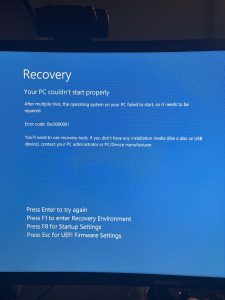
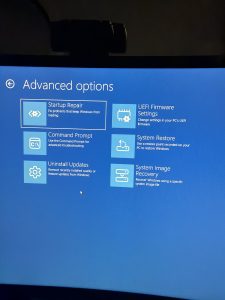
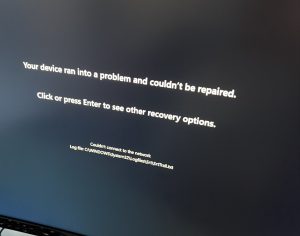
Instead of booting normally, the system dropped into the Windows recovery environment.
Then again.
And again.
A wild full boot loop has been spotted!
No desktop. No Unreal Engine. No access to the project. At that point, Discovery Park wasn’t blocked by design problems:
It was blocked by the machine itself.
Let’s Get Better!
I Can Fix This!
Before taking it in for repair, I decided to debug the issue myself and venture into command-line-land like a fearless professional.
I worked through multiple layers of recovery:
- Ran DISM /RestoreHealth to repair the Windows image
- Ran SFC /scannow to check system file integrity (no violations found)
- Ran CHKDSK to repair the file system (no bad sectors)
- Attempted Startup Repair (failed with log errors)
- Tried booting into Safe Mode (failed, returned to recovery)
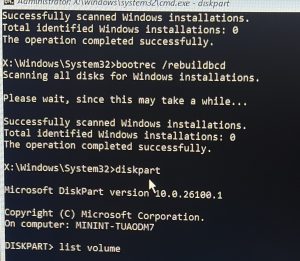
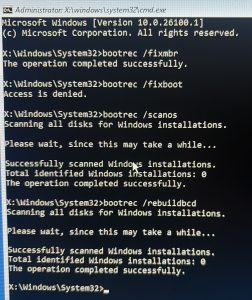
- Rebuilt boot configuration using bootrec
- Recreated EFI boot files using bcdboot
- Verified the Windows directory still existed on the drive
I tried ALL of these things, and everything pointed to the same strange reality: The system was intact, but it couldn’t start.
What Am I Fixing?
I knew this much:
The failure began immediately after waking the computer from hibernate.
Based on the symptoms, the issue was likely:
- A corrupted Windows state during wake
- Or a failure in the boot configuration / startup sequence
Something in that transition broke the system’s ability to load, even though the actual files were still present. The OS was fine. The data was fine. The shell layer between them seemed that it is was unable to communicate.
I suspected a corrupt file somewhere. This theory seemed to fit even more once the boot loop began, because if the shell could not communicate then it could not start up Windows properly, even though Windows (and my data) existed.
Which may be why every repair tool almost worked… but never actually resolved the issue.
Maybe Someone Else Can Fix This?
At that point, I was confident I knew what was wrong, but I wasn’t sure how to fix it. This felt utterly bizarre to me.
Perhaps the professionals could see something I didn’t and fix this before it escalated to wiping the system.
They didn’t.
To make a long story short, the technician agreed that I did the right things, he had a number of computers in the last two weeks suffering the same fate (due to a recent Windows update patch he suspected), and he recommended that I needed to wipe the PC and reinstall Windows.
He backed up my data to an external hard drive per my request, and reinstalled Windows. The PC worked again a few days later, I picked it up, then began the process of setting it back up.
Believe In Yourself!
A Wise Learning Moment
Though this was a bit of a nightmare of a process I went through this week that prevented me from beginning my Milestone 4 Week 8 work, it turned out okay.
This was an opportunity to learn something:
As game developers, we work on hardware. We RELY on our hardware.
Hardware is complex, it breaks, we need to dust it, it needs understanding and care. I do take great care of my PC (love that thing), but even a “perfect” computer can trip and fall, and it was important to check in with myself here:
Do I have backup systems and version control?
Can I debug a system error?
Am I unafraid to dive into the guts (command line) of a computer?
I met the challenge with passion to not only fix the computer but understand what went wrong. I’m proud that I dove right in.
Even though I did take it to a technician and it turned out I paid him to do what I could have done myself, I learned that I know more than I sometimes give myself credit for.
This Milestone 4 ended in an unexpected direction, but it was valuable all the same.
Moving On!
My system is now repaired and the project continues!
Next week for the start of Milestone 5, I will do my VFX and Sequencer work instead. This worked out well because the second week of Milestone 5 was originally planned as an extra “polish” week, so I still have plenty of time to fill in my missing bricks.
A bright side? I got an extra “bonus brick” I wasn’t expecting.
Until next time,
~Lauren
